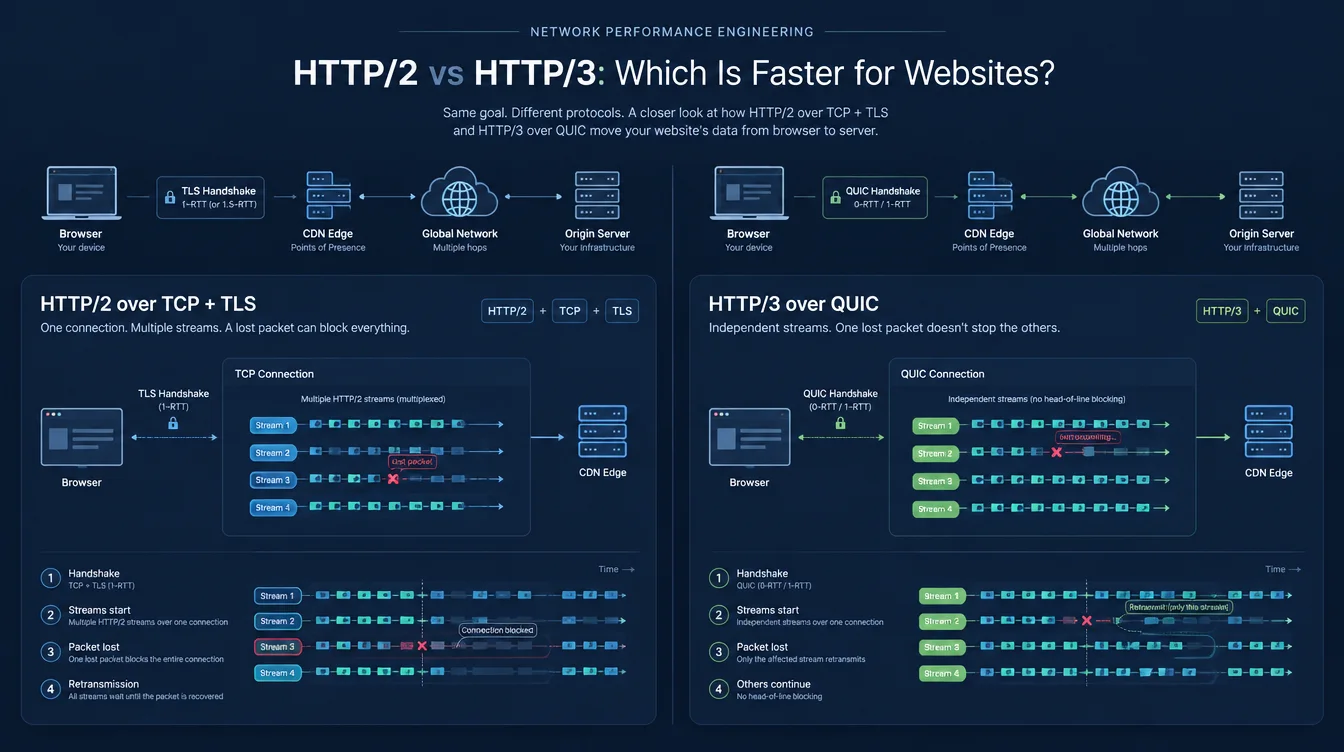
Enabling HTTP/3 is one of the few performance changes that usually requires no page-level changes. You enable it at the CDN or web server, supported browsers can negotiate it, and your HTML, CSS, and images do not need to be rewritten. That makes HTTP/3 easy to recommend, and it is often described as though it were a guaranteed speed upgrade.
The reality is narrower. HTTP/3 is clearly faster under some conditions and nearly indistinguishable from HTTP/2 under others. Whether the HTTP/2 vs HTTP/3 website speed difference reaches your visitors depends on round-trip latency, packet loss and reordering, whether the connection is fresh or already established, and whether transport is the thing limiting the page at all.
What actually changed between the two
Both protocols carry the same HTTP semantics. Methods, status codes, headers, caching rules, and the meaning of requests and responses remain HTTP. The important differences are in framing, transport, connection setup, and loss recovery.
HTTP/2 multiplexes over one TCP connection
HTTP/2 uses binary framing and allows many requests and responses to share a single TCP connection. Instead of relying on several parallel connections to keep resources moving, a browser can interleave multiple HTTP streams across one connection. HPACK also compresses repeated header fields.
This removes much of the request-level queueing associated with HTTP/1.1, but HTTP/2 still inherits a limitation from TCP. TCP presents an ordered byte stream. If a TCP segment is lost, later bytes cannot be delivered to the application until the missing data is retransmitted, even when those bytes belong to unrelated HTTP/2 streams. A single loss event can therefore stall progress across the connection. This is transport-level head-of-line blocking.
Server Push, once promoted as a major HTTP/2 feature, is no longer a practical reason to choose the protocol. Chromium removed HTTP/2 Server Push support, while preload and 103 Early Hints provide more predictable ways to start critical resource discovery early.
HTTP/3 moves HTTP onto QUIC
HTTP/3 keeps multiplexed HTTP streams but runs them over QUIC. QUIC uses UDP datagrams as its substrate and implements reliable delivery, congestion control, encryption, and stream management in the QUIC transport itself.
The key performance difference is that QUIC provides ordering within an individual stream rather than one connection-wide ordered byte stream. Loss affecting one stream does not force unrelated streams to wait for that missing data. A delayed image stream therefore does not automatically stop an independent stylesheet or script stream from making progress.
QUIC also integrates the TLS 1.3 handshake with transport setup, uses connection IDs so an established connection can survive certain network-path changes, and HTTP/3 replaces HPACK with QPACK so header compression works with QUIC's delivery model without reintroducing connection-wide blocking.
Connection setup is where HTTP/3 has its clearest latency advantage
A new HTTPS connection using HTTP/2 over TCP normally needs a TCP handshake before the TLS handshake can complete. With TLS 1.3, that means roughly one round trip for TCP plus one for TLS before a normal application request can proceed. A conventional full TLS 1.2 handshake can require another round trip. QUIC combines transport and TLS 1.3 negotiation, so a new HTTP/3 connection can become ready after one round trip when no additional validation step is required.
Saving a round trip matters in proportion to the path RTT. Between a visitor and a nearby CDN edge, the saving may be small. Between a visitor in East Asia and an origin or edge endpoint far away, one avoided round trip can be much more visible before useful response data begins to arrive.
Returning connections can reduce setup further through early data. TLS 1.3 defines 0-RTT early data for HTTP, including multiplexed HTTP such as HTTP/2, while QUIC also supports 0-RTT application data on resumed connections. Early data has replay risks, so it is suitable only where the client and server can safely handle replayable requests.
Discovery matters too. An origin can advertise HTTP/3 through Alt-Svc, in which case a browser often learns about the HTTP/3 endpoint from an earlier HTTP response. Modern DNS can also advertise an HTTP/3-capable endpoint with an HTTPS resource record using the h3 ALPN identifier, allowing supporting clients to learn that option during name resolution rather than only after an HTTP/2 connection has already been made.
Head-of-line blocking matters most when packets are lost
QUIC's stream independence is real, but its advantage grows with loss and reordering. On a clean, low-latency path, HTTP/2 and HTTP/3 can look very similar after connection setup. When packets are lost, HTTP/3 can keep unrelated streams moving while HTTP/2 remains constrained by TCP's connection-wide ordered delivery.
That is why results differ by audience and route. Congested mobile networks, distant international paths, unstable Wi-Fi, and other lossy conditions give HTTP/3 more opportunity to help. A stable wired connection to a nearby CDN edge may show little difference. Both observations can be correct because they describe different network conditions.
Prioritisation is separate from the transport choice. HTTP/2's original dependency-tree priority mechanism was deprecated after implementation problems. The newer Extensible Priorities model is designed for both HTTP/2 and HTTP/3, so resource scheduling quality depends on the browser, server, CDN, and their implementations rather than simply on choosing one protocol version.
Connection migration can help mobile sessions
QUIC uses connection IDs so an established client connection is not identified only by a fixed IP-address-and-port pair. In QUIC version 1, a client can migrate an established connection to a new network path after the handshake, subject to path validation and peer configuration.
For a short page view on a stable network, this may never matter. For longer sessions, media, large transfers, or an application that remains active while a phone changes network path, avoiding a complete connection teardown and new handshake can remove an otherwise visible interruption.
What HTTP/3 does not fix
The protocol changes how bytes are transported. It does not remove the bottlenecks that dominate many slow websites:
- Server processing time. If an application spends 800 ms generating HTML, HTTP/3 does not make that application code execute faster. TTFB includes work before the first response byte reaches the browser, so a lower TTFB after a protocol change can reflect connection setup rather than faster server-side execution.
- Page weight. Oversized images and large JavaScript bundles still contain the same content bytes.
- Render-blocking resources. A blocking stylesheet or synchronous script can delay rendering regardless of transport.
- Third-party origins. Fonts, analytics, tag managers, ads, and other third parties negotiate their own connections and protocols.
- Cache misses. A cached response served from an edge close to the visitor can matter far more than a protocol change applied to an uncached response.
HTTP/3 also has operational trade-offs. QUIC processing cost depends on the software stack, kernel and NIC offload capabilities, encryption implementation, traffic profile, and server hardware; it should not be assumed to have one universal CPU penalty or advantage. Some networks also block or impair UDP traffic, in which case clients need a working fallback to a TCP-based HTTP version. And HTTP/3 at a CDN edge does not imply that the CDN-to-origin hop also uses HTTP/3.
So which one is faster?
For a fresh connection across a high-latency or lossy path, HTTP/3 has the stronger case. For an already-established connection on a short, clean path, the difference may be smaller than ordinary run-to-run variation.
The useful reframing is that HTTP/3 primarily improves connection establishment and resilience to transport loss across independent streams. If the page is slow because the server spends a long time generating HTML, JavaScript blocks the main thread, or images are unnecessarily large, switching protocols does not address the dominant cause.
HTTP/3 is still a sensible default when your CDN or server supports it reliably and HTTP/2 fallback remains available. It just should not outrank larger structural bottlenecks in a performance remediation plan.
Checking what your site negotiates with Latixo
Protocol assumptions are unreliable because negotiation happens at connection time. In the current Latixo production test, the result page reports the protocol negotiated for the main document navigation, together with TTFB, HTTP status, content type, load time, request count, node, screenshot, and loading replay.
Important: the current Latixo production result does not expose per-resource protocol versions or response headers. Use browser developer tools or your CDN/server diagnostics when you specifically need to inspect Alt-Svc or verify the protocol used by individual third-party requests.
For a useful HTTP/2 versus HTTP/3 comparison, avoid judging the change from a single total-load-time number. Run each configuration several times, keep the test region and Desktop/Mobile profile constant, and compare the distribution of TTFB and total load time rather than one isolated run.
If your audience is spread across regions, repeat the same test from more than one Browser Node. Start with a node near your origin or CDN edge, then repeat from a more distant region such as Tokyo, Japan. The wider path can make connection-setup differences easier to observe, while Latixo's synthetic Browser Nodes still represent controlled lab conditions rather than every real user's mobile or Wi-Fi network.